# browser
Interactive Chromium sessions on the [iii engine](https://github.com/iii-hq/iii)
bus. Agents start a session, read the page as an accessibility-tree outline,
click and type against element refs, and read the page's own console and
network history back as data. The single most important thing it gives you:
"why is my dev server page blank?" becomes answerable, because the page's
console errors are one `browser::console::read` away. The [console](../console)
worker adds the human window: a live Browser page with a streaming viewport
(Chromium-pushed screencast frames), the console feed, and click-to-pick
elements into chat.
## In the console
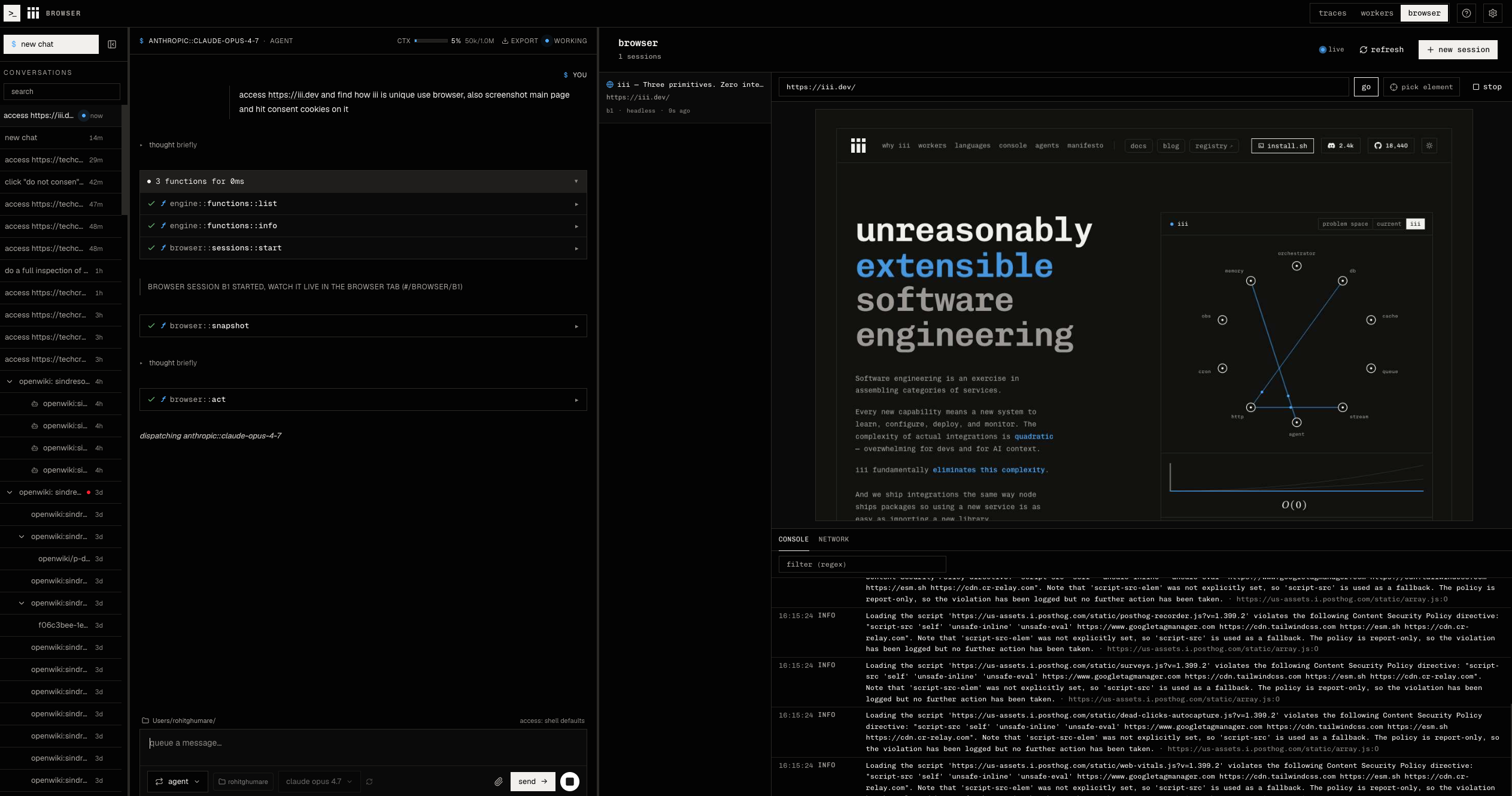
An agent reads a page as an accessibility outline (`browser::snapshot`) while
you watch the live viewport and console feed:
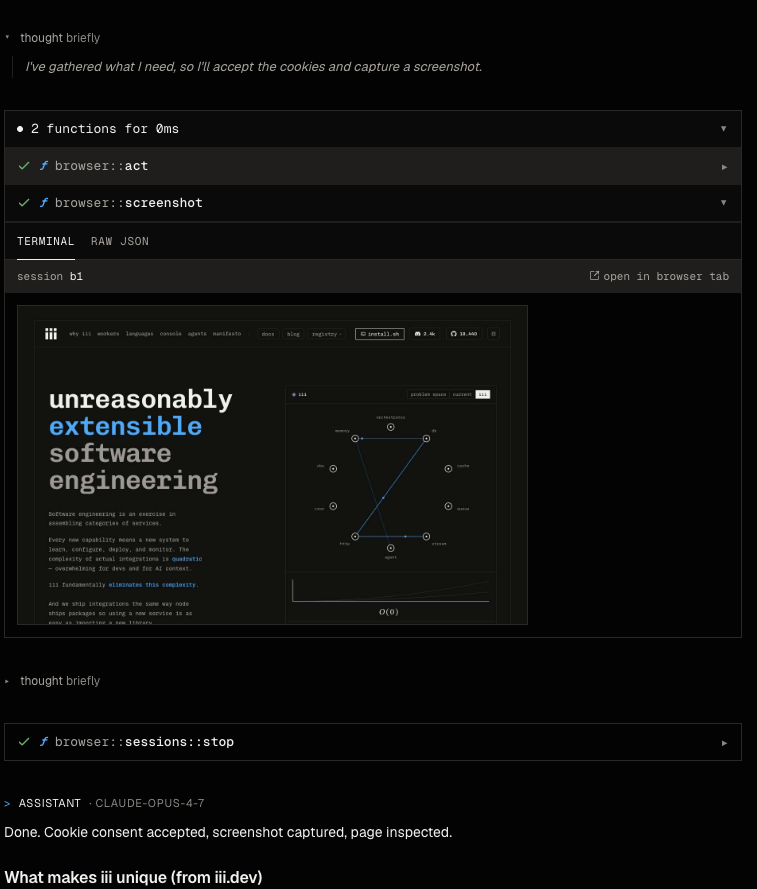
 `browser::screenshot` renders the captured image inline in the chat card:
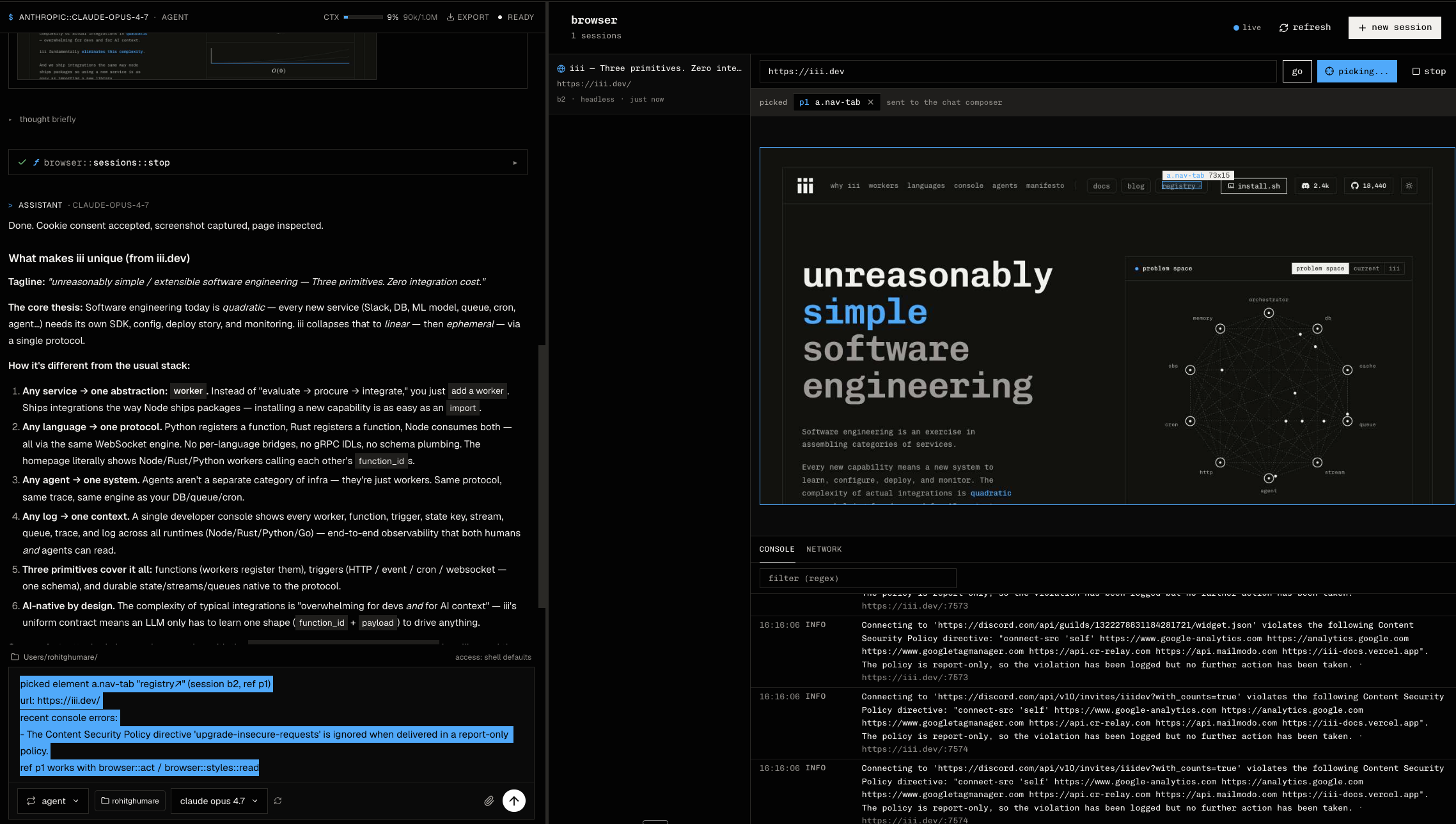
 Pick mode highlights the element under the cursor and drops it into the chat
composer as an actionable ref:
Pick mode highlights the element under the cursor and drops it into the chat
composer as an actionable ref:
 ## Install
```bash
iii worker add browser
```
`iii worker add` fetches the binary, writes a config block into
`~/.iii/config.yaml`, and the engine starts the worker on the next
`iii start`. The worker drives a Chromium/Chrome already installed on the
machine; point `executable` at a specific binary if auto-detection picks the
wrong one.
To watch sessions live, pick elements into chat, and follow the agent's
browsing from a UI, add the [console](../console) worker as well:
```bash
iii worker add console
```
## Quickstart
Start a session, read the page, act on it, then read the console:
```rust
use iii_sdk::protocol::TriggerRequest;
use iii_sdk::{register_worker, InitOptions};
use serde_json::json;
#[tokio::main]
async fn main() -> anyhow::Result<()> {
let iii = register_worker("ws://localhost:49134", InitOptions::default());
let started = iii.trigger(TriggerRequest {
function_id: "browser::sessions::start".into(),
payload: json!({ "url": "http://localhost:3000" }),
action: None,
timeout_ms: Some(30_000),
}).await?;
let session_id = started["session_id"].as_str().unwrap();
// The page as text: an a11y outline with [ref=eN] handles.
let snapshot = iii.trigger(TriggerRequest {
function_id: "browser::snapshot".into(),
payload: json!({ "session_id": session_id }),
action: None,
timeout_ms: Some(15_000),
}).await?;
println!("{}", snapshot["tree"].as_str().unwrap());
// What did the page log? Errors only, no dump.
let console = iii.trigger(TriggerRequest {
function_id: "browser::console::read".into(),
payload: json!({ "session_id": session_id, "level": "error" }),
action: None,
timeout_ms: Some(10_000),
}).await?;
println!("{console:#}");
Ok(())
}
```
The rest of the surface: `browser::act` (click/hover/type/press/scroll by
ref or coordinates, left/right/middle and double-click), `browser::evaluate`
(JS expression), `browser::screenshot` (viewable JPEG), `browser::history`
(back/forward/reload), `browser::network::read` (requests + failures),
`browser::dom::read` (DOM tree with refs), `browser::styles::read` /
`browser::styles::write` (computed styles + live inline edits, the design
panel backing), and `browser::sessions::list` / `browser::sessions::stop`.
Function ids and schemas live in the code and `iii worker info browser`.
## Configuration
Stored in the `configuration` worker under the `browser` key; every field is
editable live from the console. Caps and timeouts hot-reload; `executable`,
`headless`, and the viewport apply to sessions started after the change.
```yaml
browser:
executable: '' # empty = auto-detect Chrome/Chromium/Edge
user_data_dir: '' # set a path to persist cookies/logins across sessions
headless: true # false shows a real window locally
max_sessions: 4 # concurrent Chromium processes
console_buffer: 500 # per-session console ring buffer (entries)
network_buffer: 500 # per-session network ring buffer (entries)
viewport_width: 1280
viewport_height: 800
default_timeout_ms: 30000 # navigation/act/evaluate default
max_timeout_ms: 120000 # ceiling; caller timeout_ms clamped DOWN to this
idle_stop_ms: 300000 # stop sessions idle this long; 0 disables
screenshot_quality: 60 # JPEG quality 1-100
allowed_schemes: [http, https]
max_snapshot_nodes: 2000 # a11y outline size cap
```
## Custom trigger types
Sibling workers (and the console UI) can subscribe to session activity. All
bindings accept an optional `{ "session_id": "..." }` filter.
| Trigger type | Fires when | Payload to subscribers |
|---|---|---|
| `browser::session-started` | A session is up and ready | `{ session_id, url, headless, timestamp }` |
| `browser::session-stopped` | A session ended | `{ session_id, reason: "stopped" \| "idle" \| "crashed", timestamp }` |
| `browser::navigated` | The page committed a navigation | `{ session_id, url, timestamp }` |
| `browser::console-event` | A console/log/exception entry was captured | `{ session_id, entry }` |
| `browser::picked` | The human picked an element in inspect mode | `{ session_id, element, timestamp }` |
`browser::console-event` is high-volume; bind it with a `session_id` filter
and treat `browser::console::read` as the durable record. `browser::picked`
elements carry a `ref` that `browser::act` accepts directly, so a human pick
flows straight into agent action.
## Element picking
`browser::pick::start` puts the page in DevTools inspect mode (native hover
highlight); the human's click resolves to tag, attributes, outer HTML, text,
bounds, and recent console errors, emitted as `browser::picked`. The pick,
hint, screencast, and frame functions are internal: console-UI plumbing, not
agent surface, and they stay out of agent tool lists.
## Install
```bash
iii worker add browser
```
`iii worker add` fetches the binary, writes a config block into
`~/.iii/config.yaml`, and the engine starts the worker on the next
`iii start`. The worker drives a Chromium/Chrome already installed on the
machine; point `executable` at a specific binary if auto-detection picks the
wrong one.
To watch sessions live, pick elements into chat, and follow the agent's
browsing from a UI, add the [console](../console) worker as well:
```bash
iii worker add console
```
## Quickstart
Start a session, read the page, act on it, then read the console:
```rust
use iii_sdk::protocol::TriggerRequest;
use iii_sdk::{register_worker, InitOptions};
use serde_json::json;
#[tokio::main]
async fn main() -> anyhow::Result<()> {
let iii = register_worker("ws://localhost:49134", InitOptions::default());
let started = iii.trigger(TriggerRequest {
function_id: "browser::sessions::start".into(),
payload: json!({ "url": "http://localhost:3000" }),
action: None,
timeout_ms: Some(30_000),
}).await?;
let session_id = started["session_id"].as_str().unwrap();
// The page as text: an a11y outline with [ref=eN] handles.
let snapshot = iii.trigger(TriggerRequest {
function_id: "browser::snapshot".into(),
payload: json!({ "session_id": session_id }),
action: None,
timeout_ms: Some(15_000),
}).await?;
println!("{}", snapshot["tree"].as_str().unwrap());
// What did the page log? Errors only, no dump.
let console = iii.trigger(TriggerRequest {
function_id: "browser::console::read".into(),
payload: json!({ "session_id": session_id, "level": "error" }),
action: None,
timeout_ms: Some(10_000),
}).await?;
println!("{console:#}");
Ok(())
}
```
The rest of the surface: `browser::act` (click/hover/type/press/scroll by
ref or coordinates, left/right/middle and double-click), `browser::evaluate`
(JS expression), `browser::screenshot` (viewable JPEG), `browser::history`
(back/forward/reload), `browser::network::read` (requests + failures),
`browser::dom::read` (DOM tree with refs), `browser::styles::read` /
`browser::styles::write` (computed styles + live inline edits, the design
panel backing), and `browser::sessions::list` / `browser::sessions::stop`.
Function ids and schemas live in the code and `iii worker info browser`.
## Configuration
Stored in the `configuration` worker under the `browser` key; every field is
editable live from the console. Caps and timeouts hot-reload; `executable`,
`headless`, and the viewport apply to sessions started after the change.
```yaml
browser:
executable: '' # empty = auto-detect Chrome/Chromium/Edge
user_data_dir: '' # set a path to persist cookies/logins across sessions
headless: true # false shows a real window locally
max_sessions: 4 # concurrent Chromium processes
console_buffer: 500 # per-session console ring buffer (entries)
network_buffer: 500 # per-session network ring buffer (entries)
viewport_width: 1280
viewport_height: 800
default_timeout_ms: 30000 # navigation/act/evaluate default
max_timeout_ms: 120000 # ceiling; caller timeout_ms clamped DOWN to this
idle_stop_ms: 300000 # stop sessions idle this long; 0 disables
screenshot_quality: 60 # JPEG quality 1-100
allowed_schemes: [http, https]
max_snapshot_nodes: 2000 # a11y outline size cap
```
## Custom trigger types
Sibling workers (and the console UI) can subscribe to session activity. All
bindings accept an optional `{ "session_id": "..." }` filter.
| Trigger type | Fires when | Payload to subscribers |
|---|---|---|
| `browser::session-started` | A session is up and ready | `{ session_id, url, headless, timestamp }` |
| `browser::session-stopped` | A session ended | `{ session_id, reason: "stopped" \| "idle" \| "crashed", timestamp }` |
| `browser::navigated` | The page committed a navigation | `{ session_id, url, timestamp }` |
| `browser::console-event` | A console/log/exception entry was captured | `{ session_id, entry }` |
| `browser::picked` | The human picked an element in inspect mode | `{ session_id, element, timestamp }` |
`browser::console-event` is high-volume; bind it with a `session_id` filter
and treat `browser::console::read` as the durable record. `browser::picked`
elements carry a `ref` that `browser::act` accepts directly, so a human pick
flows straight into agent action.
## Element picking
`browser::pick::start` puts the page in DevTools inspect mode (native hover
highlight); the human's click resolves to tag, attributes, outer HTML, text,
bounds, and recent console errors, emitted as `browser::picked`. The pick,
hint, screencast, and frame functions are internal: console-UI plumbing, not
agent surface, and they stay out of agent tool lists.