<div align="center">

# harness

**A thin, durable turn loop that turns a model plus a few iii workers into an agent.**

<p>
  <a href="#install"><img alt="Install: iii worker add harness" src="https://img.shields.io/badge/install-iii%20worker%20add%20harness-0a84ff?style=flat-square"></a>
  <a href="../LICENSE"><img alt="License: Apache 2.0" src="https://img.shields.io/badge/license-Apache%202.0-blue.svg?style=flat-square"></a>
  <a href="https://www.rust-lang.org"><img alt="Built with Rust" src="https://img.shields.io/badge/built%20with-rust-orange?style=flat-square&logo=rust&logoColor=white"></a>
</p>

<p><sub><b>INSTALLS WITH HARNESS</b></sub></p>

<p>
  <a href="https://workers.iii.dev/workers/iii-directory"><img alt="iii-directory" src="https://workers.iii.dev/workers/iii-directory/badge.svg"></a>
  <a href="https://workers.iii.dev/workers/session-manager"><img alt="session-manager" src="https://workers.iii.dev/workers/session-manager/badge.svg"></a>
  <a href="https://workers.iii.dev/workers/context-manager"><img alt="context-manager" src="https://workers.iii.dev/workers/context-manager/badge.svg"></a>
  <a href="https://workers.iii.dev/workers/provider-anthropic"><img alt="provider-anthropic" src="https://workers.iii.dev/workers/provider-anthropic/badge.svg"></a>
  <a href="https://workers.iii.dev/workers/provider-openai"><img alt="provider-openai" src="https://workers.iii.dev/workers/provider-openai/badge.svg"></a>
  <a href="https://workers.iii.dev/workers/shell"><img alt="shell" src="https://workers.iii.dev/workers/shell/badge.svg"></a>
  <a href="https://workers.iii.dev/workers/web"><img alt="web" src="https://workers.iii.dev/workers/web/badge.svg"></a>
  <a href="https://workers.iii.dev/workers/iii-state"><img alt="iii-state" src="https://workers.iii.dev/workers/iii-state/badge.svg"></a>
  <a href="https://workers.iii.dev/workers/queue"><img alt="queue" src="https://workers.iii.dev/workers/queue/badge.svg"></a>
  <a href="https://workers.iii.dev/workers/iii-cron"><img alt="iii-cron" src="https://workers.iii.dev/workers/iii-cron/badge.svg"></a>
  <a href="https://workers.iii.dev/workers/iii-stream"><img alt="iii-stream" src="https://workers.iii.dev/workers/iii-stream/badge.svg"></a>
  <a href="https://workers.iii.dev/workers/iii-observability"><img alt="iii-observability" src="https://workers.iii.dev/workers/iii-observability/badge.svg"></a>
  <a href="https://workers.iii.dev/workers/configuration"><img alt="configuration" src="https://workers.iii.dev/workers/configuration/badge.svg"></a>
</p>

</div>

`harness` is the thin, durable turn loop that turns a model plus a few iii
workers into an agent. It takes an incoming message, persists it, assembles a
context, streams a completion, runs any function calls the model requests, and
repeats until the turn stops — all as durable, resumable steps so a crash or
restart picks up mid-turn. It wires [`session-manager`](https://github.com/iii-hq/workers/tree/main/session-manager)
(transcript), [`context-manager`](https://github.com/iii-hq/workers/tree/main/context-manager) (token budgeting, soft
dependency), and [`llm-router`](https://github.com/iii-hq/workers/tree/main/llm-router) (generation); install those
alongside it for the full loop.

## Quickstart

Install the engine, start it, then add harness and the console from a second
terminal in the same folder:

```bash
curl -fsSL https://install.iii.dev/iii/main/install.sh | sh
mkdir iii-app && cd iii-app
touch config.yaml
iii -c config.yaml
```

```bash
# New terminal, SAME folder. `iii worker add` writes to the config.yaml in the
# current directory, so it has to match the directory the engine runs in.
cd iii-app
iii worker add harness console
```

```bash
open http://localhost:3113
```

Add a model key from the console: open the model picker and use **configure
Anthropic** / **configure OpenAI** to paste a key. It is stored in the
`llm-router` worker config and the model catalog populates within seconds.
Until a provider is configured the picker is empty and chat will not generate.

<p align="center">
  <img src="https://iii.dev/blog/_astro/provider-configuration.DWWh-ski_Z2rzBYt.webp" alt="Configure a provider key in the iii console" width="100%">
</p>

`iii worker add harness` installs every worker the loop needs (see the badges
above); you do not add them one by one. During bootstrap, the harness asks the
`queue` worker to define a dedicated `harness-turn` queue before it reports
ready. That queue is FIFO within each `session_id` and processes separate
sessions concurrently; startup fails if the queue cannot be ensured.

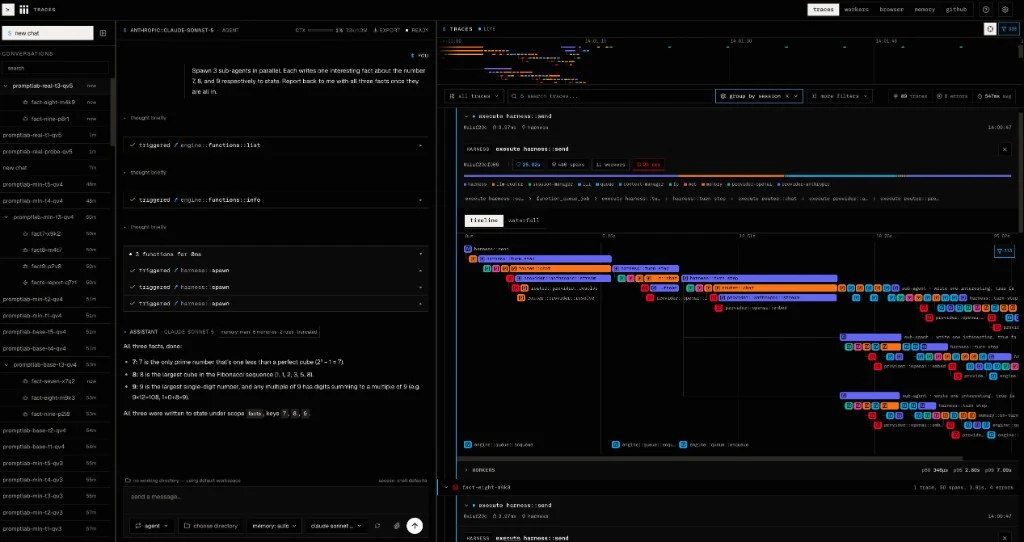
Every turn, sub-agent spawn, and provider call is one correlated trace: the
harness turn waterfall in the console. Failed descendants stamp the whole trace
as failed and carry standard error attributes. The session transcript keeps the
same recovery, partial-output, and blocked-reaction explanation after refresh.

<p align="center">
  <img src="https://iii.dev/blog/_astro/harness-turn-waterfall.CVg_Sl12_23G6C5.webp" alt="Harness turn waterfall in the iii console" width="100%">
</p>

The agent-facing function surface is deny-by-default: with no `functions.allow`
globs, every model-requested call is refused and the harness is a plain chat
loop. Allow functions in per-send (`options.functions.allow`) and gate them
with the optional [`approval-gate`](https://github.com/iii-hq/workers/tree/main/approval-gate) sibling.

The full function reference (every `harness::*` id and its request/response
schema) lives in the code and `iii worker info harness`.

Building a consumer — a chat UI, a Telegram/WhatsApp bridge, a cron worker, or
any event-driven loop on top of the harness? Start with the integration
contract in
[`architecture/integration.md`](architecture/integration.md): the functions to
trigger, the triggers to bind, and the canonical consumer patterns.

## Working with iii

iii is a WebSocket-routed worker mesh. One engine holds a live registry of every
connected worker, their functions, and the triggers bound to them. Calls route
worker to engine to worker, so the language, runtime, and location of a worker
are invisible; the function id is the only contract.

**1. Discover what is already there (the engine is the source of truth)**
- `engine::functions::list` — every function across all workers (filter with `prefix` / `search` / `worker`)
- `engine::functions::info { function_id }` — the request/response schema for ONE function (this is your API reference)
- `engine::workers::list` / `engine::workers::info { name }` — connected workers and their surface
- `engine::triggers::list` / `engine::triggers::info { id }` — legal trigger types and their config schemas
- `engine::registered-triggers::list` — every trigger instance already bound

**2. Call a function.** Use `agent_trigger` with `{ function: "<worker>::<fn>", payload: { ... } }`. Two rules: payload is a JSON object (never a stringified one), and you fetch the contract via `engine::functions::info` before the first call.

**3. Need a capability that is not registered?**
- `directory::registry::workers::list { search: "<capability>" }`
- `directory::registry::workers::info { name }` to judge fit
- `worker::add { source: { kind: "registry", name: "<name>" } }` to install
- confirm with `engine::functions::list { prefix: "<worker>::" }` and fetch each contract

**4. Worker lifecycle.** `worker::list`, `worker::add`, `worker::start`, `worker::stop`, `worker::update`, `worker::remove`, `worker::clear`. Destructive ops require exactly `yes: true`.

**5. Triggers, not polling.** To react to events (HTTP, schedule, webhook, file change), bind a trigger instead of polling. Discover the type with `engine::triggers::list`, copy config from its schema, and confirm the binding fires with a real call (e.g. `web::fetch` to its local URL).

**6. Handy workers.**
- `web::fetch` — all HTTP(S); pass `format: "markdown"` to read docs without flooding context
- `coder::*` — file ops for any code task (read/search/create/update/move/delete)
- `slack::*` — post to Slack

**7. Authoring a worker.** Read the SDK reference for your language first (Node / Python / Rust / Browser / Engine WS) at https://iii.dev/docs/sdk-reference/. Use the SDK's `registerWorker(...)` and call `iii.registerFunction` / `iii.registerTrigger` / `iii.trigger` on the returned value; they are methods, not top-level exports. Always declare `description`, `request_format`, and `response_format` so the next caller gets a real contract.

TL;DR: list, info, call. The engine tells you the truth; trust it over memory.

## Configuration

The `harness` configuration entry is owned by the `configuration` worker; every
field hot-reloads (no restart). The fields a deployment is most likely to tune:

```yaml
default_max_turns: 16            # per-turn generate-step cap when a send omits it
default_pending_timeout_ms: 1800000  # legacy parked-call (hold / pre-deploy child) wait guard
max_depth: 3                     # sub-agent depth budget
max_children: 8                  # sub-agent spawns-per-turn budget
max_transient_resumes: 1         # recovery generations after a partial stream failure
sweep_expression: "0 * * * * *"  # cron for the pending-call expiry sweep
```

Other keys (RPC timeouts, stream coalescing, idempotency TTL, validation
retries) and their defaults live in [`src/config.rs`](src/config.rs).

## System prompt

The identity prompt is assembled once at send/spawn time. For a TOP-LEVEL turn
(`harness::send`) the harness asks the llm-router for the effective
per-provider prompt (`router::system_prompt::get` with the request's
`provider`): provider workers declare their own identity prompt at
registration, and operators can override it per provider by setting
`system_prompt` in the `llm-router` configuration entry (unset = provider
default). When the router serves nothing — router absent, unknown provider,
or no declared prompt — the harness falls back to its embedded step-by-step
default prompt ([`prompts/default.txt`](prompts/default.txt)). Spawned
CHILDREN never get the orchestrator prompt: every child is seeded with the
embedded minimal sub-agent identity
([`prompts/subagent.txt`](prompts/subagent.txt)) — do the one task, write the
named state destination, stop — with spawn `options.system_prompt` as the
escape hatch.

An optional `mode` (`plan` | `ask` | `agent`) prepends a short operating-mode
paragraph. A non-empty `options.system_prompt` is combined with the built-in
prompt per `options.system_prompt_strategy`: `enrich` (default) appends it to
the built-in prompt, while `override` uses it verbatim. Assembly is tested in
[`src/prompt/tests.rs`](src/prompt/tests.rs); provider-specific prompt bodies
live in each provider worker (`provider-*/prompts/identity.txt`).

## Custom trigger types

The harness emits two async orchestration trigger types siblings and consumers
bind to, and registers five synchronous hook points operator-trusted siblings
plug into in-path. Bind with the standard two-step pattern.

| Trigger type | Kind | Fires / runs |
|---|---|---|
| `harness::turn-started` | async event | A turn began executing (first loop step). |
| `harness::turn-completed` | async event | A turn reached a terminal status (`completed` / `cancelled` / `failed`), carrying the result and `terminal: bool` — `false` while the session still owns an armed wake (a one-shot notify), meaning a later turn carries the run's real outcome; consumers finalize a logical exchange only on `terminal: true`. |
| `harness::hook::pre-turn` | sync hook | First step of a turn, before any model spend. May veto. |
| `harness::hook::pre-generate` | sync hook | After context assembly, before generation. May extend the system prompt, append messages, or veto. |
| `harness::hook::post-generate` | sync hook | After the final assistant message. Observe only. |
| `harness::hook::pre-trigger` | sync hook | After the allow/deny policy passes, before the target runs. May deny, hold, or rewrite arguments. |
| `harness::hook::post-trigger` | sync hook | After the target returns, before the result is persisted. May rewrite the result. |

Event configs accept `{ session_id?, parent_session_id? }`; hook configs accept
`{ functions?, priority?, timeout_ms?, on_error? }`. See the spec at
[`tech-specs/2026-06-agentic/harness.md`](https://github.com/iii-hq/workers/blob/main/tech-specs/2026-06-agentic/harness.md)
for the hook contract and chain semantics.